

10. évf.: Hálózat gyakorlás - VLAN alapok
10. évf.: Hálózat gyakorlás - VLAN alapok
Feladat – VLAN kommunikáció és szeparáció Packet Tracerben
Egy kis hálózatot kell kialakítani három telephely között.
Mindhárom telephelyen található:
1 router
1 switch
1 PC
A három telephely routerei egymással WAN kapcsolaton keresztül kommunikálnak.
A hálózat célja annak bemutatása, hogy az azonos VLAN-ba tartozó gépek kommunikálhatnak egymással, míg a külön VLAN-ba tartozó gép nem érhető el.
Hálózati topológia
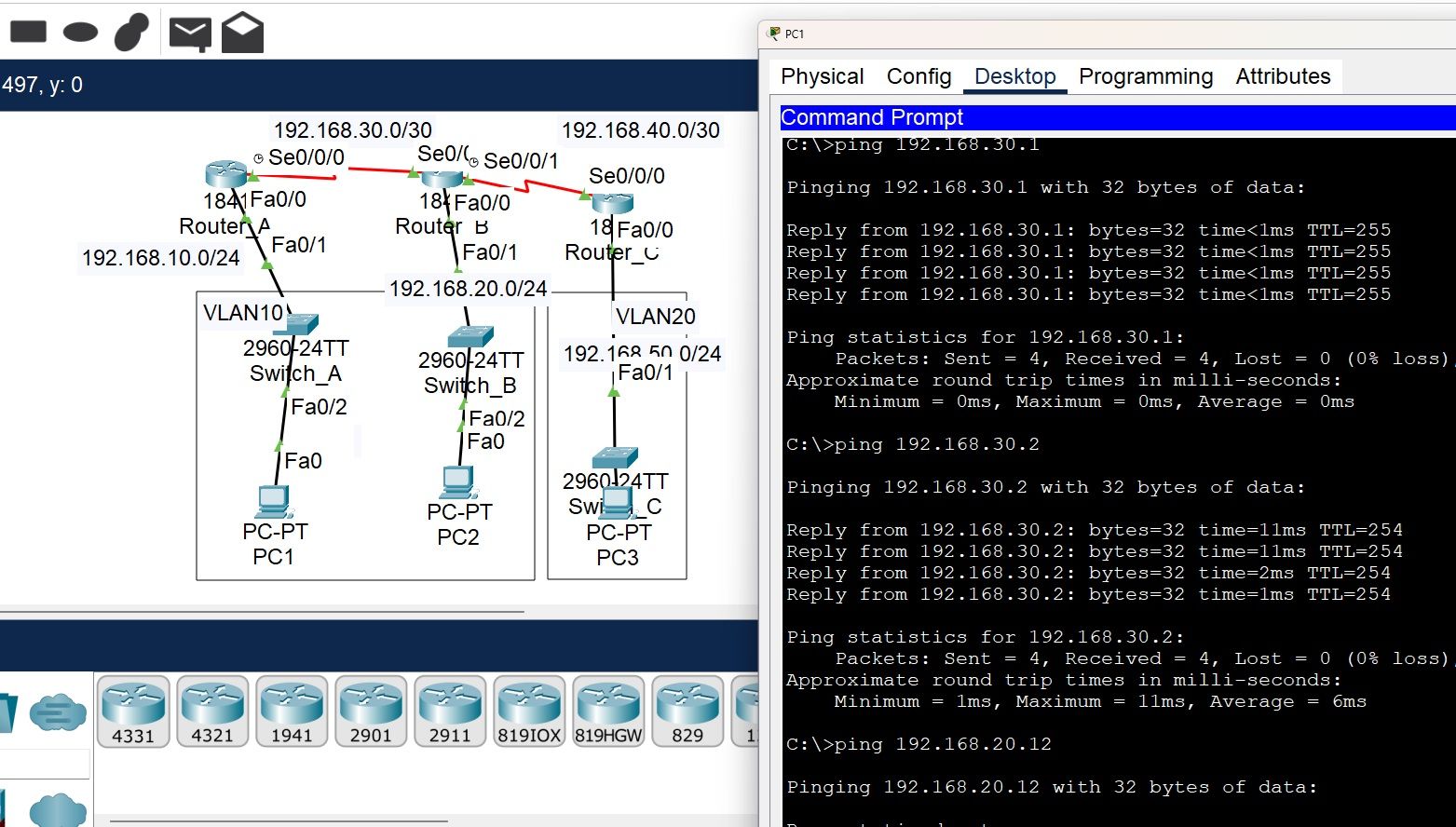
VLAN követelmények
| PC | VLAN | Hálózat |
|---|---|---|
| PC1 | VLAN10 | 192.168.10.0/24 |
| PC2 | VLAN10 | 192.168.20.0/24 |
| PC3 | VLAN20 | 192.168.50.0/24 |
Elvárt működés:
PC1 pingeli PC2-t → sikeres
PC1 pingeli PC3-at → nem sikeres
PC2 pingeli PC3-at → nem sikeres
IP címzés
PC-k
PC1
IP: 192.168.10.11
Mask: 255.255.255.0
Gateway: 192.168.10.1
PC2
IP: 192.168.20.12
Mask: 255.255.255.0
Gateway: 192.168.10.2
PC3
IP: 192.168.50.13
Mask: 255.255.255.0
Gateway: 192.168.20.1
Megoldás:
Router_A
enable
conf t
hostname Router_A
interface fa0/1
ip address 192.168.10.1 255.255.255.0
no shutdown
interface s0/0/0
ip address 192.168.30.1 255.255.255.252
clock rate 64000
no shutdown
ip route 192.168.20.0 255.255.255.0 192.168.30.2
ip route 192.168.50.0 255.255.255.0 192.168.30.2
end
wr
Router_B (középső)
enable
conf t
hostname Router_B
interface fa0/1
ip address 192.168.20.1 255.255.255.0
no shutdown
interface s0/0/0
ip address 192.168.30.2 255.255.255.252
no shutdown
interface s0/0/1
ip address 192.168.40.1 255.255.255.252
clock rate 64000
no shutdown
ip route 192.168.10.0 255.255.255.0 192.168.30.1
ip route 192.168.50.0 255.255.255.0 192.168.40.2
end
wr
Router_C
enable
conf t
hostname Router_C
interface fa0/1
ip address 192.168.50.1 255.255.255.0
no shutdown
interface s0/0/0
ip address 192.168.40.2 255.255.255.252
no shutdown
ip route 192.168.10.0 255.255.255.0 192.168.40.1
ip route 192.168.20.0 255.255.255.0 192.168.40.1
end
wr
Switch_A
enable
conf t
vlan 10
interface fa0/2
switchport mode access
switchport access vlan 10
interface fa0/1
switchport mode access
switchport access vlan 10
end
wr
Switch_B
enable
conf t
vlan 20
interface fa0/2
switchport mode access
switchport access vlan 20
interface fa0/1
switchport mode access
switchport access vlan 20
end
wr
Switch_C
enable
conf t
vlan 30
interface fa0/2
switchport mode access
switchport access vlan 30
interface fa0/1
switchport mode access
switchport access vlan 30
end
wr
Megoldás:
Switch_A
enable
conf t
vlan 10
name VLAN10
interface fa0/2
switchport mode access
switchport access vlan 10
interface fa0/1
switchport mode access
switchport access vlan 10
end
wr
Switch_B
enable
conf t
vlan 10
name VLAN10
interface fa0/2
switchport mode access
switchport access vlan 10
interface fa0/1
switchport mode access
switchport access vlan 10
end
wr
Switch_C
enable
conf t
vlan 20
name VLAN20
interface fa0/2
switchport mode access
switchport access vlan 20
interface fa0/1
switchport mode access
switchport access vlan 20
end
wr
Router soros kapcsolatok (ehhez a rajzhoz)
Router1
enable
conf t
interface fa0/0
ip address 192.168.10.1 255.255.255.0
no shutdown
interface s0/0/0
ip address 10.0.0.1 255.255.255.252
clock rate 64000
no shutdown
ip route 192.168.10.0 255.255.255.0 10.0.0.2
end
wr
Router2
enable
conf t
interface fa0/1
ip address 192.168.10.2 255.255.255.0
no shutdown
interface s0/0/0
ip address 10.0.0.2 255.255.255.252
no shutdown
interface s0/0/1
ip address 10.0.0.5 255.255.255.252
clock rate 64000
no shutdown
ip route 192.168.10.0 255.255.255.0 10.0.0.1
end
wr
Router3
enable
conf t
interface fa0/1
ip address 192.168.20.1 255.255.255.0
no shutdown
interface s0/0/0
ip address 10.0.0.6 255.255.255.252
no shutdown
end
wr
PC címzés
PC1
IP 192.168.10.11
Mask 255.255.255.0
Gateway 192.168.10.1
PC2
IP 192.168.10.12
Mask 255.255.255.0
Gateway 192.168.10.2
PC3
IP 192.168.20.13
Mask 255.255.255.0
Gateway 192.168.20.1
Mit kell látnod működéskor
PC1 → PC2
ping 192.168.10.12
megy.
PC1 → PC3
ping 192.168.20.13
nem megy.
Pont ez a VLAN szegmentáció lényege.