

10. évf.: VLAN gyakorlás 2
10. évf.: VLAN gyakorlás 2
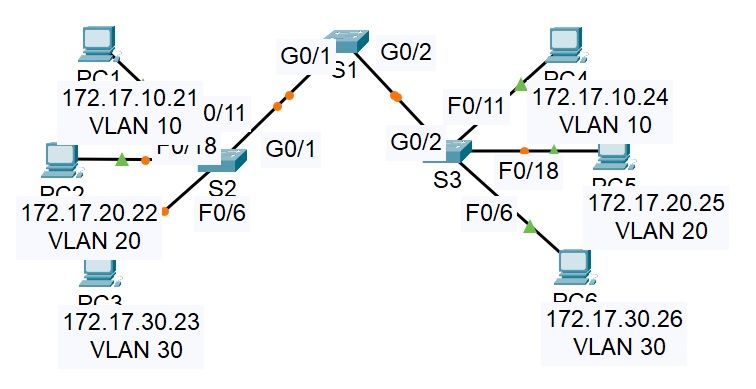
VLAN trunk gyakorlása megoldás:
S1(config)# interface range g0/1 - 2
S1(config-if)# switchport mode trunk
S1(config-if)# switchport trunk native vlan 99
S2(config)#interface g0/1
S2(config-if)#switchport mode trunk
S2(config-if)#switchport trunk native vlan 99
S3(config)#interface g0/2
S3(config-if)#switchport mode trunk
S3(config-if)#switchport trunk native vlan 99
S2:
S2#show interface g0/1 switchport
Name: Gig0/1
Switchport: Enabled
Administrative Mode: trunk
Operational Mode: trunk
Administrative Trunking Encapsulation: dot1q
Operational Trunking Encapsulation: dot1q
Negotiation of Trunking: On
Access Mode VLAN: 1 (default)
Trunking Native Mode VLAN: 99 (Native)
Voice VLAN: none
Administrative private-vlan host-association: none
Administrative private-vlan mapping: none
Administrative private-vlan trunk native VLAN: none
Administrative private-vlan trunk encapsulation: dot1q
Administrative private-vlan trunk normal VLANs: none
Administrative private-vlan trunk private VLANs: none
Operational private-vlan: none
Trunking VLANs Enabled: All
Pruning VLANs Enabled: 2-1001
Capture Mode Disabled
Capture VLANs Allowed: ALL
Protected: false
Unknown unicast blocked: disabled
Unknown multicast blocked: disabled
Appliance trust: none
S2:
S3#show interface g0/2 switchport
Name: Gig0/2
Switchport: Enabled
Administrative Mode: trunk
Operational Mode: trunk
Administrative Trunking Encapsulation: dot1q
Operational Trunking Encapsulation: dot1q
Negotiation of Trunking: On
Access Mode VLAN: 1 (default)
Trunking Native Mode VLAN: 99 (Native)
Voice VLAN: none
Administrative private-vlan host-association: none
Administrative private-vlan mapping: none
Administrative private-vlan trunk native VLAN: none
Administrative private-vlan trunk encapsulation: dot1q
Administrative private-vlan trunk normal VLANs: none
Administrative private-vlan trunk private VLANs: none
Operational private-vlan: none
Trunking VLANs Enabled: All
Pruning VLANs Enabled: 2-1001
Capture Mode Disabled
Capture VLANs Allowed: ALL
Protected: false
Unknown unicast blocked: disabled
Unknown multicast blocked: disabled
Appliance trust: none
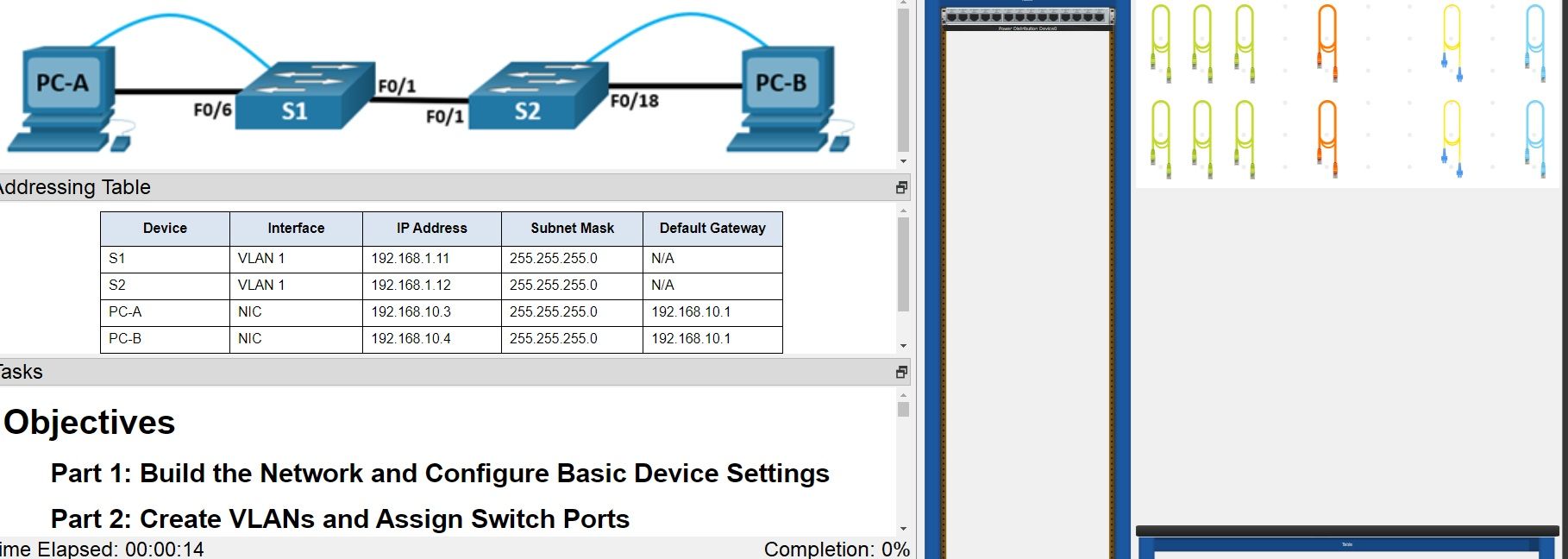
VLAN trunk valós eszközön megoldása:
Sa és S2 beállítása:
Switch> enable
Switch# config terminal
Switch(config)# hostname S1
Switch(config)# hostname S2
S1(config)# enable secret class
S2(config)# enable secret class
S1(config)# line console 0
S1(config-line)# password cisco
S1(config-line)# login
S2(config)# line console 0
S2(config-line)# password cisco
S2(config-line)# login
S1(config)# line vty 0 4
S1(config-line)# password cisco
S1(config-line)# login
S2(config)# line vty 0 4
S2(config-line)# password cisco
S2(config-line)# login
S1(config)# service password-encryption
S2(config)# service password-encryption
S1(config)# banner motd QNe lepj be!Q
S2(config)# banner motd QNe lepj be!Q
S1(config)# interface vlan 1
S1(config-if)# ip address 192.168.1.11 255.255.255.0
S1(config-if)# no shutdown
S1(config-if)# exit
S2(config)# interface vlan 1
S2(config-if)# ip address 192.168.1.12 255.255.255.0
S2(config-if)# no shutdown
S2(config-if)# exit
S1(config)# interface range f0/2-5, f0/7-24, g0/1-2
S1(config-if-range)# shutdown
S1(config-if-range)# exit
S1(config)# exit
S2(config)# interface range f0/2-17, f0/19-24, g0/1-2
S2(config-if-range)# shutdown
S2(config-if-range)# exit
S2(config)# exit
S1# clock set 15:30:00 19 August 2021
S2# clock set 15:30:00 19 August 2021
Aztán a VLAN-ok:
S1(config)# vlan 10
S1(config-vlan)# name Operations
S1(config-vlan)# vlan 20
S1(config-vlan)# name Parking_Lot
S1(config-vlan)# vlan 99
S1(config-vlan)# name Management
S1(config-vlan)# vlan 1000
S1(config-vlan)# name Native
S1(config-vlan)# end
S1-PCA-val:
S1(config)# interface f0/6
S1(config-if)# switchport mode access
S1(config-if)# switchport access vlan 10
S1(config)# interface vlan 1
S1(config-if)# no ip address
S1(config-if)# interface vlan 99
S1(config-if)# ip address 192.168.1.11 255.255.255.0
S1(config-if)# end
S2-PCB-vel:
S2(config)# interface f0/18
S2(config-if)# switchport mode access
S2(config-if)# switchport access vlan 10
S2(config)# interface vlan 1
S2(config-if)# no ip address
S2(config-if)# interface vlan 99
S2(config-if)# ip address 192.168.1.12 255.255.255.0
Natívot:
S1(config)# interface range f0/11-24
S1(config-if-range)# switchport mode access
S1(config-if-range)# switchport access vlan 99
S1(config-if-range)# end
VLAN 10 F11-21:
S1(config)# interface range f0/11, f0/21
S1(config-if-range)# switchport access vlan 10
S1(config-if-range)# end
F24-ből kiszedni:
S1(config)# interface f0/24
S1(config-if)# no switchport access vlan
S1(config-if)# end
Aztán kiszedni a VLAN adatbázisból az ID-t:
S1(config)# interface f0/24
S1(config-if)# switchport access vlan 30
VLAN 30-at úgyahogy van törölni:
S1(config)# no vlan 30
S1(config)# end
24-es portot kiszedni VLAN-ból:
S1(config)# interface f0/24
S1(config-if)# no switchport access vlan
S1(config-if)# end
DTP módot beállítani:
S1(config)# interface f0/1
S1(config-if)# switchport mode dynamic desirable
manuálisan trönkportá adni a f/0-et:
S1(config)# interface f0/1
S1(config-if)# switchport mode trunk
S2(config)# interface f0/1
S2(config-if)# switchport mode trunk
Natívot beállítani:
S1(config)# interface f0/1
S1(config-if)# switchport trunk native vlan 1000
S2(config)# interface f0/1
S2(config-if)# switchport trunk native vlan 1000
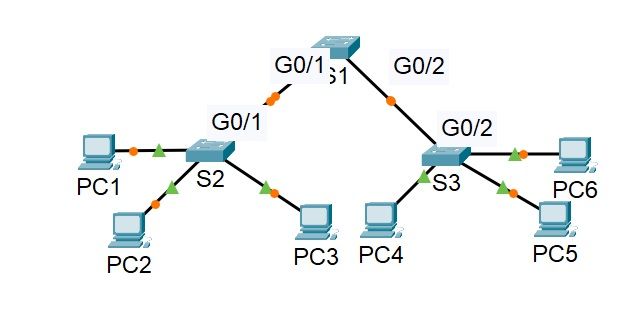
Vlan gyakorlása megoldás:
Switch S1:
enable
config t
vlan 10
name Red
vlan 20
name Blue
vlan 30
name Yellow
interface g0/1
switchport mode dynamic desirable
switchport trunk native vlan 999
interface g0/2
switchport mode trunk
switchport trunk native vlan 999
switchport nonegotiate
end
Switch S2:
enable
config t
vlan 10
name Red
vlan 20
name Blue
vlan 30
name Yellow
interface range f0/1 - 8
switchport mode access
switchport access vlan 10
interface range f0/9 - 16
switchport mode access
switchport access vlan 20
interface range f0/17 - 24
switchport mode access
switchport access vlan 30
interface GigabitEthernet0/1
switchport mode dynamic auto
switchport trunk native vlan 999
end
Switch S3:
enable
config t
vlan 10
name Red
vlan 20
name Blue
vlan 30
name Yellow
interface range f0/1 - 8
switchport mode access
switchport access vlan 10
interface range f0/9 - 16
switchport mode access
switchport access vlan 20
interface range f0/17 - 24
switchport mode access
switchport access vlan 30
interface GigabitEthernet0/2
switchport trunk native vlan 999
switchport mode trunk
switchport nonegotiate
end